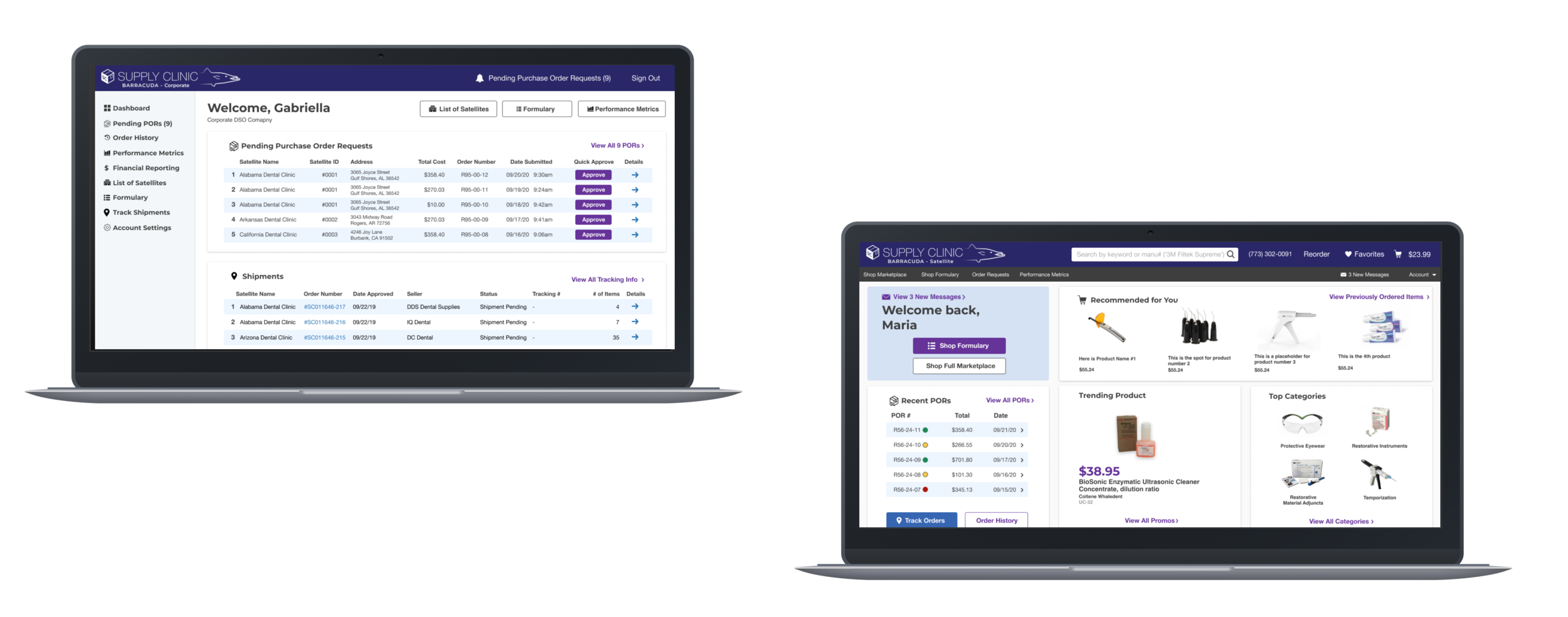
Supply Clinic’s Procurement Suite
Summary
Designed and shipped webapp to streamline B2B dental supplies procurement for Dental Service Organizations (DSOs). Analyzed market opportunities, communicated with key industry players to develop user journeys, identified design principles, created and tested prototypes for the minimum viable product (MVP), shipped the product, created a roadmap for additional features.
The Procurement Suite is a webapp designed for DSOs to streamline e-commerce purchasing across large groups of dental clinics. This case study will go over the research, design, testing, and future of this project. After launch, sales revenue scaled up by 250%.
Role and Team: Sole UX/UI designer and front-end developer. Collaborated with a business analyst, customer service team, and 2 other developers.
The Brief
Dental service organizations, or DSOs, are groups of dental clinics whose finances are managed by a single Corporate office. This Corporate office is responsible for managing inventory, negotiating pricing agreements, and overseeing cash flow across all their Satellite offices. These multi-location organizations needed a way to simplify the procurement process and identify savings opportunities.
Supply Clinic is a startup that built and maintains a B2B e-commerce marketplace for dental and healthcare supplies. On Supply Clinic, dental clinics are able to compare products and prices from hundreds of sellers and manufacturers, and purchase supplies from many sources within one transaction. Supply Clinic makes agreements with various sellers to host their products on the marketplace. Following substantial initial growth, Supply Clinic needed a way to scale its marketplace through one-to-many sales transactions.
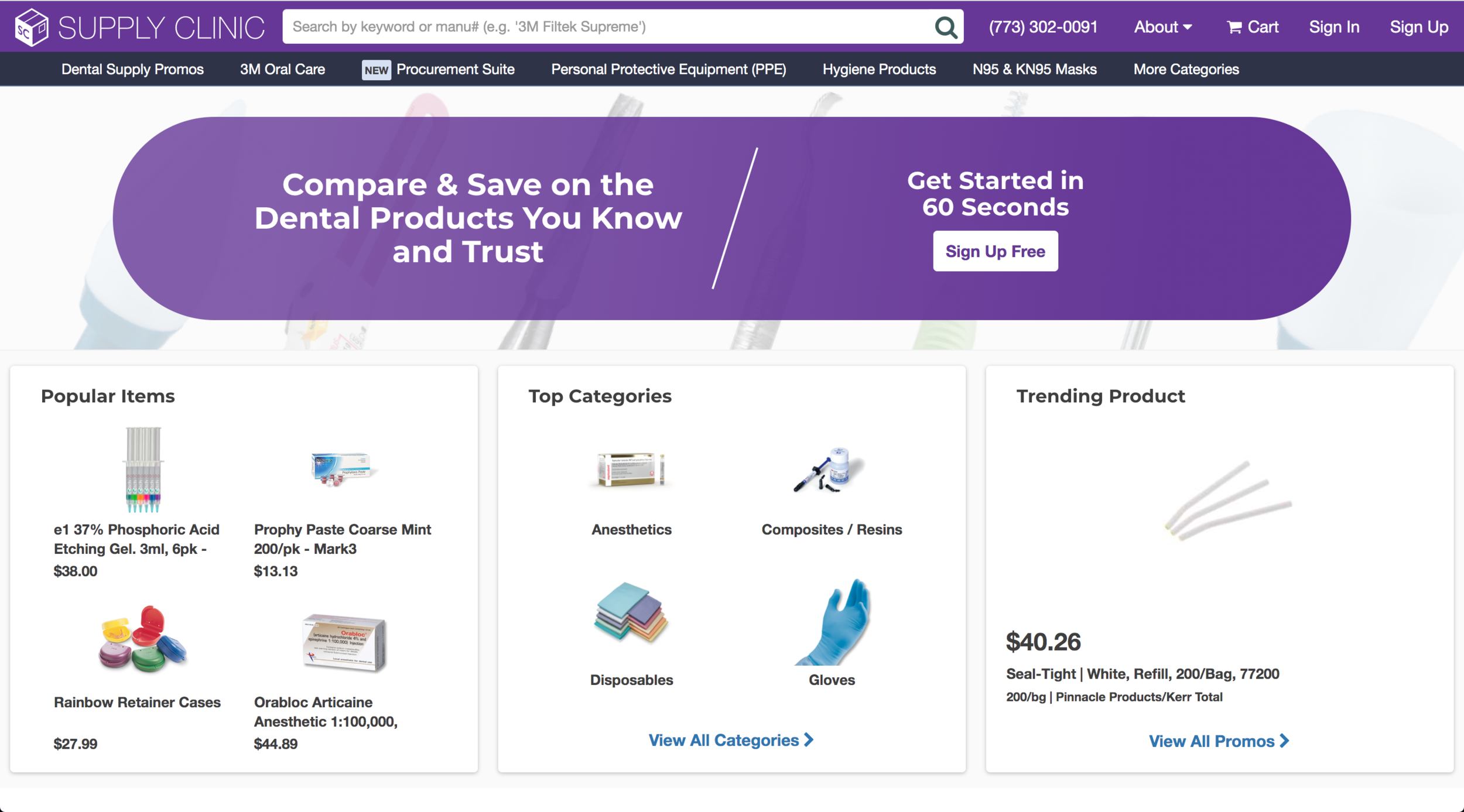
Supply Clinic’s e-commerce homepage
Key Outcomes
Our goal was to deploy a webapp through which a DSO with multiple dental clinics can coordinate the procurement of dental and healthcare supplies for all their clinics. This included user and market research aimed at identifying features for a MVP, pivoting the platform to facilitate a tiered subscription model, and a roadmap for the development of future features.
Background
Initially, Supply Clinic’s e-commerce marketplace allowed any dental clinic to browse healthcare products from hundreds of sellers across the United States, create a shopping cart, and purchase the products in their cart. To scale Supply Clinic’s business model, they decided to explore the creation of a webapp (built atop their e-commerce marketplace) to streamline the procurement process for dental service organizations with multiple clinics. Since a single DSO Corporate office might manage dozens of dental clinics (referred to as Satellites), creating this platform would increase sales through one-to-many sales transactions and SaaS subscription fees.
User Research and Pain Points
The business analyst and I teamed up to create a research plan that began with consulting with DSOs to learn their current procurement practices and identify opportunity gaps. After we created a list of hundreds of DSOs, we directed our customer service teams to reach out and conduct user interviews with some open-ended questions that I had written:
Can you tell me about how your DSO is structured and how your offices communicate about procurement?
How do you currently go about the procurement process? Can you walk me through it and describe the tools you’re using? Why are you using these tools?
How do you feel about your current process? Why?
Can you tell me about a time when you were frustrated during the procurement process? What was the problem, what caused it, and how did you solve it?
What procurement features could your organization really benefit from? Why?
We collected our qualitative data and sorted the answers into themes in order to gain insights. Our themes were:
Integrations with Formularies and Negotiated Pricing Agreements
Communication
Accounting, Paper Trails, and Data Dashboards
Theme 1: Integrations with Formularies and Negotiated Pricing Agreements
From the interviews, we learned that many existing platforms did not support Formulary Compliance or Negotiated Pricing Agreements. In healthcare supplies procurement, a formulary is a list of products that is approved by a Corporate office for the Satellites to buy. Formularies exist because a DSO might have a preference for certain products within the marketplace that it wants its clinics to buy. Additionally, a DSO might have negotiated pricing agreements with some manufacturers on particular products. Communicating these lists and products across multiple clinics within a DSO sprung confusion and procurement problems. How might we integrate these elements into a seamless e-commerce experience?
Theme 2: Communication
Communication issues between Corporate and Satellite offices repeatedly surfaced in our research. Several interviewees told us that Satellites would sometimes have to cancel and redo massive orders because of miscommunication with the Corporate office, leading to logistics inefficiencies and stock level problems. In another instance, an interviewee relayed a story where a Corporate office, acting on behalf of a dozen Satellites (across multiple states), contacted dozens of sellers to change various quantities on a dozen orders. How might we streamline this two-tiered communication mishap, and have a paper trail to match?
Theme 3: Accounting, Paper Trails, and Data Dashboards
Lastly, Corporate offices described problems with keeping track of purchase history, budgeting, and data reporting for each Satellite. How might we create a bird’s-eye-view of each Satellite’s procurement history, monthly budget and invoicing, and data regarding purchasing trends.
Summary of User Pain Points
There’s no infrastructure of integrating formularies and negotiated pricing agreements across a wide network
It’s challenging to communicate and oversee procurement across a wide network
It’s difficult to create a birds-eye-view across multiple metrics in a wide network
Design Principles
I distilled our research and user pain points into 3 design principles, which served as the basis of the prototyping process:
Provide a seamless interface through which Satellite and Corporate offices can exchange and modify procurement information before creating a transaction.
Give Satellite and Corporate users data dashboards so the DSO can coordinate procurement, make adjustments, and identify opportunities to save money.
Facilitate formulary compliance and negotiated pricing agreements.
Ideation, Flows, Feedback, and Prototypes through 3 Themes
During our ideation sessions, we identified Corporate and Satellite user types, their goals, and what they need to accomplish on their respective accounts. I created diagrams showing how Corporate and Satellite offices could interact with each other and with the marketplace. Since the needs of Corporate and Satellite offices are so different, I decided that they needed to have distinct but linked interfaces.
Theme 1: Formulary and Negotiated Pricing Integration
Formularies can include hundreds or thousands items. So for the MVP, it made more sense to load a DSO’s formulary into our system via a spreadsheet of manufacturer’s codes rather than create an interface for the Corporate user to do it manually. Our MVP would give the Corporate account a view of the formulary, and the Satellite offices would be able to view the formulary in a more familiar e-commerce-type interface, while still having full access to bespoke pricing agreements and Supply Clinic’s full marketplace.
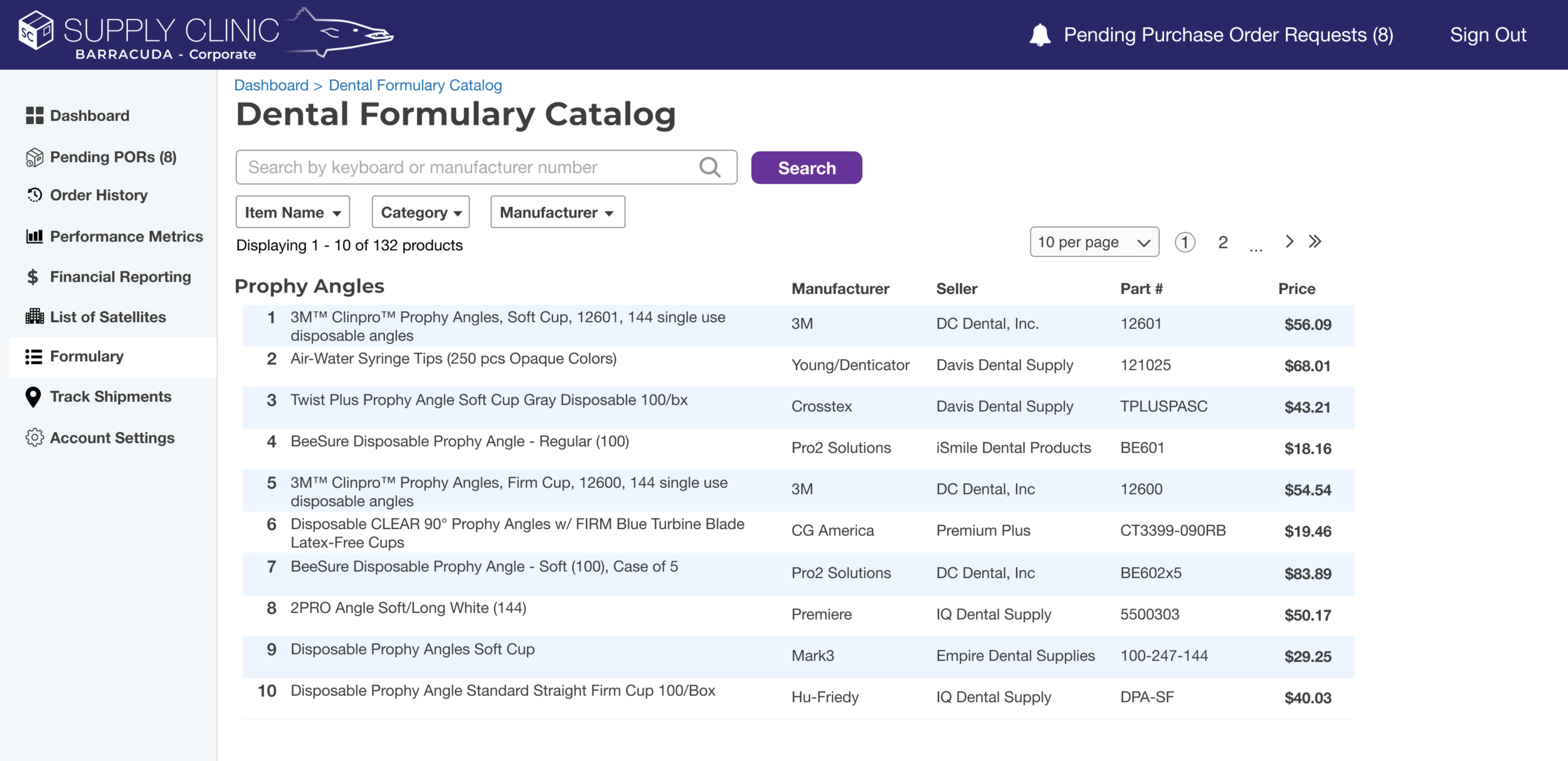
The Corporate user’s view of the Formulary. The MVP allows the Corporate office to view their Formulary, and future features will allow them to manually add and subtract items from the list, as well as seamless integrations via CSV files and SFTP.
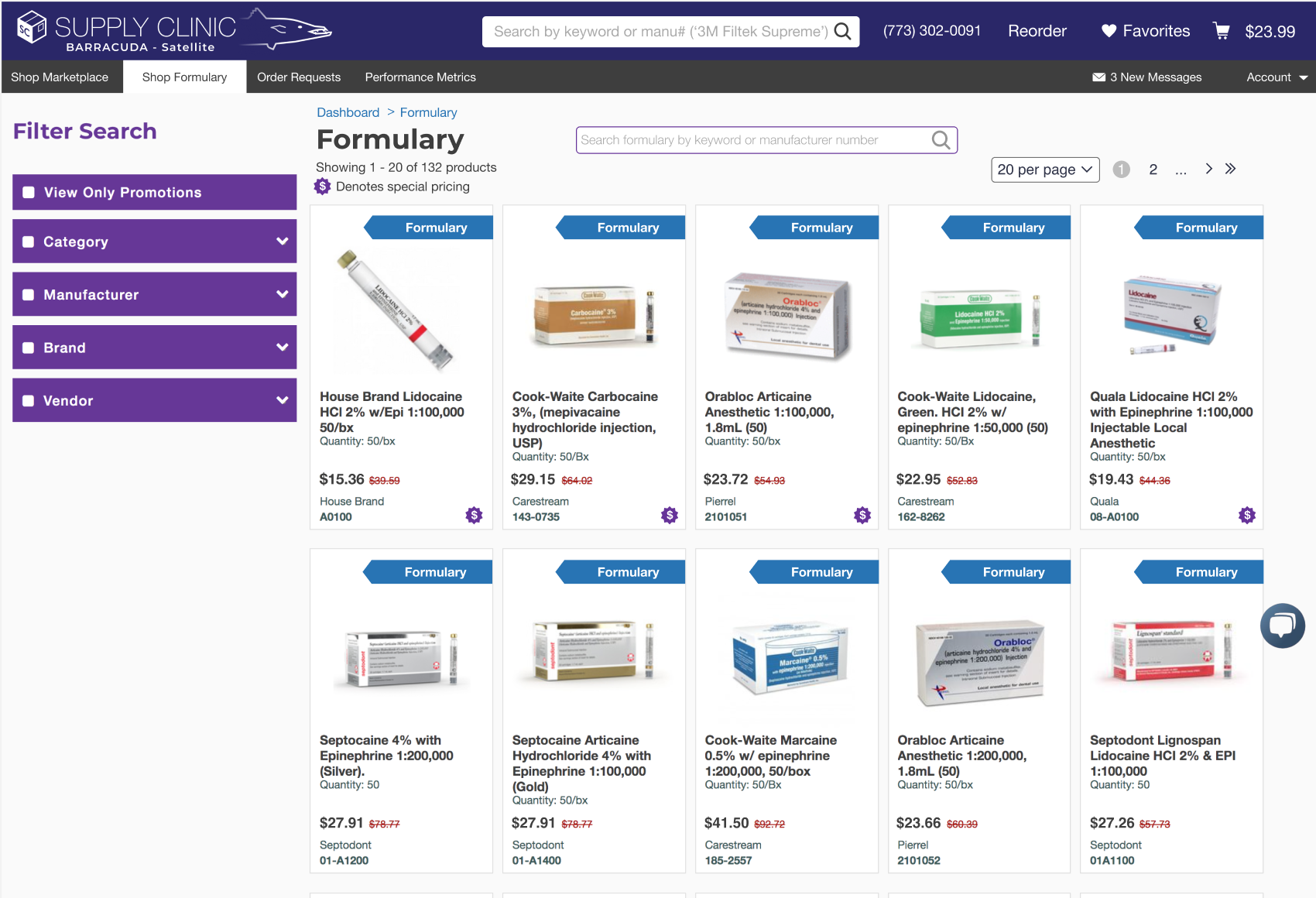
This is the Satellite user’s view of the Formulary, which includes some items with negotiated pricing agreements. This is a subset of the full marketplace, where Satellites are able to compare prices from hundreds of sellers.
Theme 2: Communication
Rather than Satellite users placing orders directly, we decided that they would create a Purchase Order Request (abbreviated POR), which is then sent to the Corporate user, who can approve, modify and approve, or reject an order. On a page showing the details of a POR, a Corporate user is able to see the items submitted for purchase by an individual Satellite office, and whether the item is included on the formulary list.
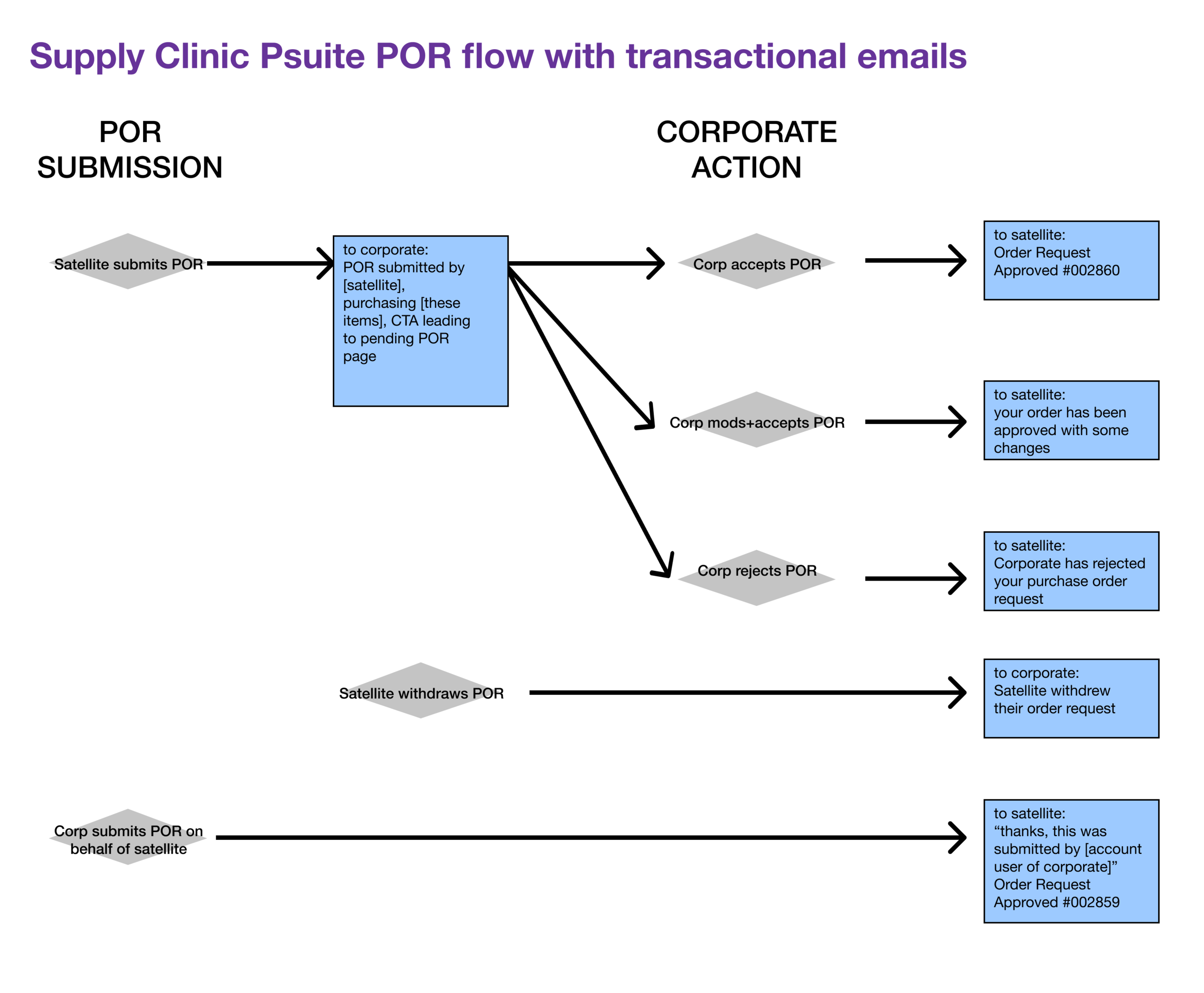
This flow chart shows the journey of POR going between a Satellite user and a Corporate user, along with the transactional emails (blue boxes) that are triggered at each step.
A Corporate user is also allowed to leave a comment on modified or rejected orders if needed. This feature would prevent entire orders from being discarded because of a single line item. If this feature were unavailable, it’d create more work for the Satellite to submit a near-identical order, producing inefficiencies, especially if order is hundreds of line items long.
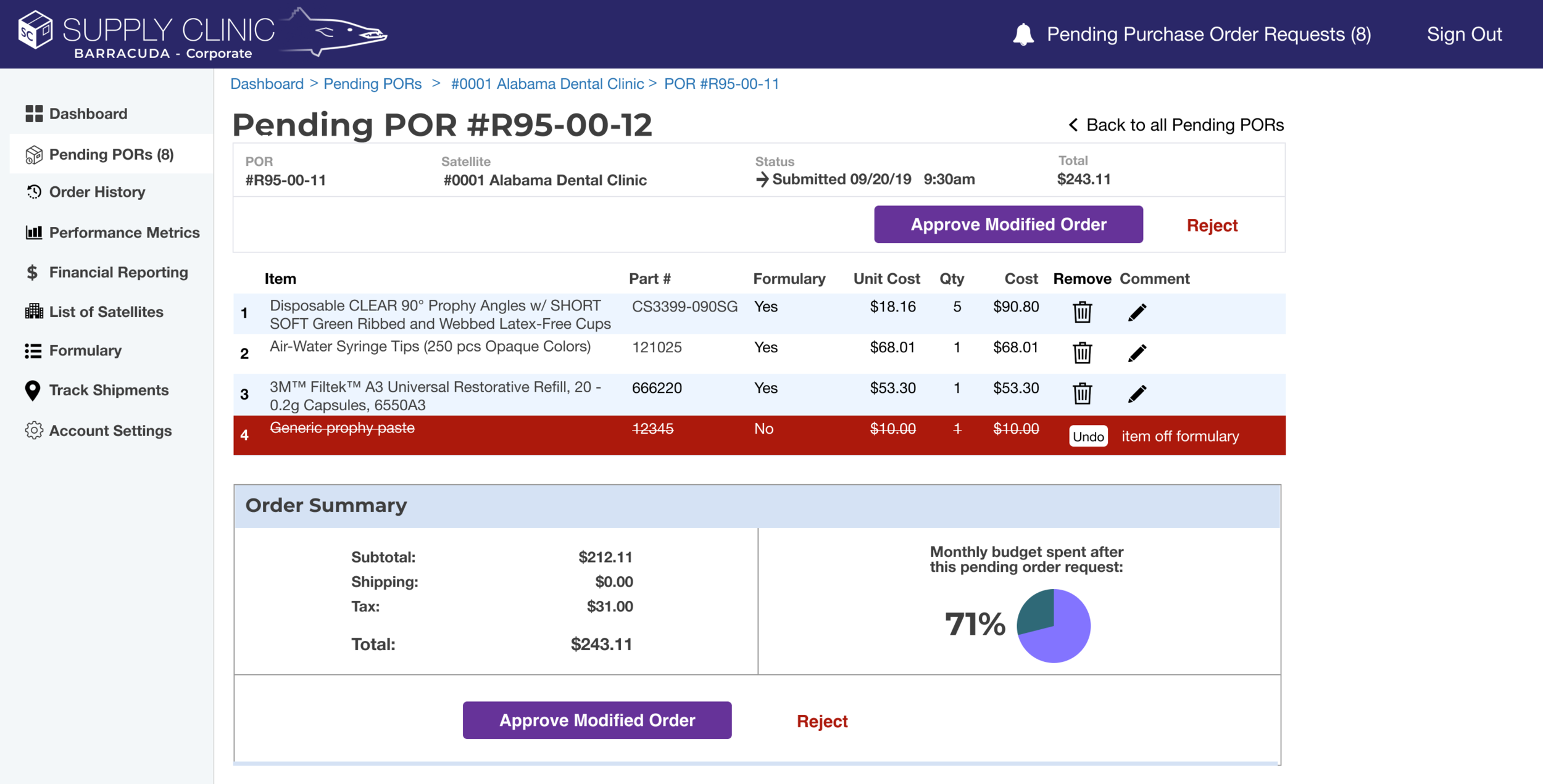
The Corporate user’s Pending Purchase Order Request page, showing a deleted line item with a comment.
This two-tiered design requires that procurement actions initiated by the Satellite user are approved by the Corporate user before any monetary transaction occurs, thus preventing communication mishaps like the ones described during our user research phase. For now, a Corporate user can only delete line items and change quantities, but future updates will allow for more advanced modifications to a purchase order such as item swaps. Additionally, all steps of this flow trigger email notifications, so all users are knowledgeable on the status of purchase requests/orders without having to log in to the interface.
Since this communication management and oversight is a main feature of the Procurement Suite, we put links to Pending PORs, Shipment Tracking, and Previous Orders on the homepage of the Corporate user.
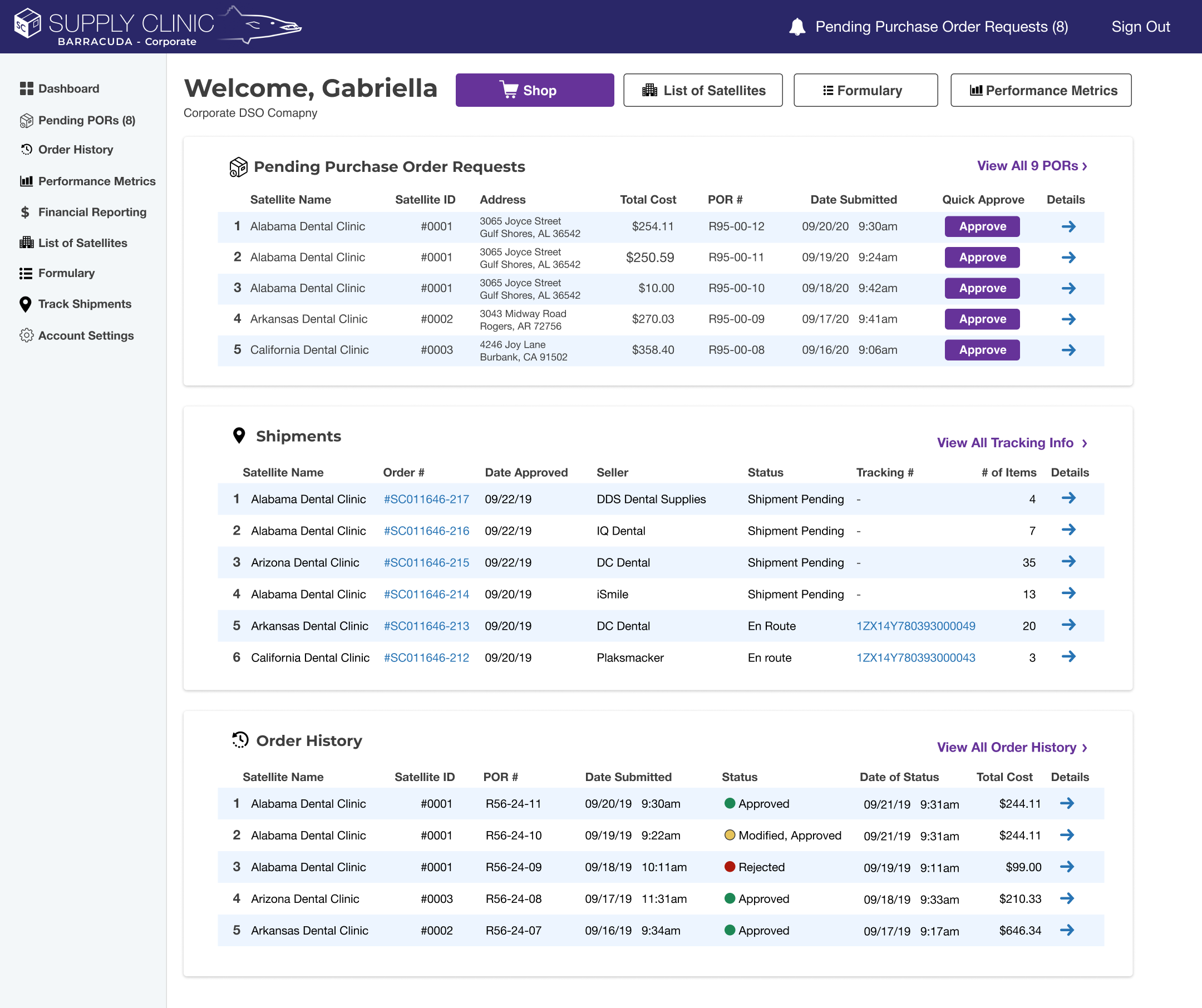
The Corporate user’s homepage, showing recent pending PORs, shipments, and recent order history, with links going to individual order and shipment pages, as well as pages showing all order history and all shipments. The sidebar serves as the navigation hub for the Corporate user.
Theme 3: Accounting, Paper Trails, and Data Dashboards
Corporate offices needed information on purchase history, budgeting, financial reporting, and data visualizations, and this information needed to be displayed per Satellite, and across the entire organization. This information helps them form a bird's-eye-view on the DSO’s procurement habits and identify money-saving opportunities.
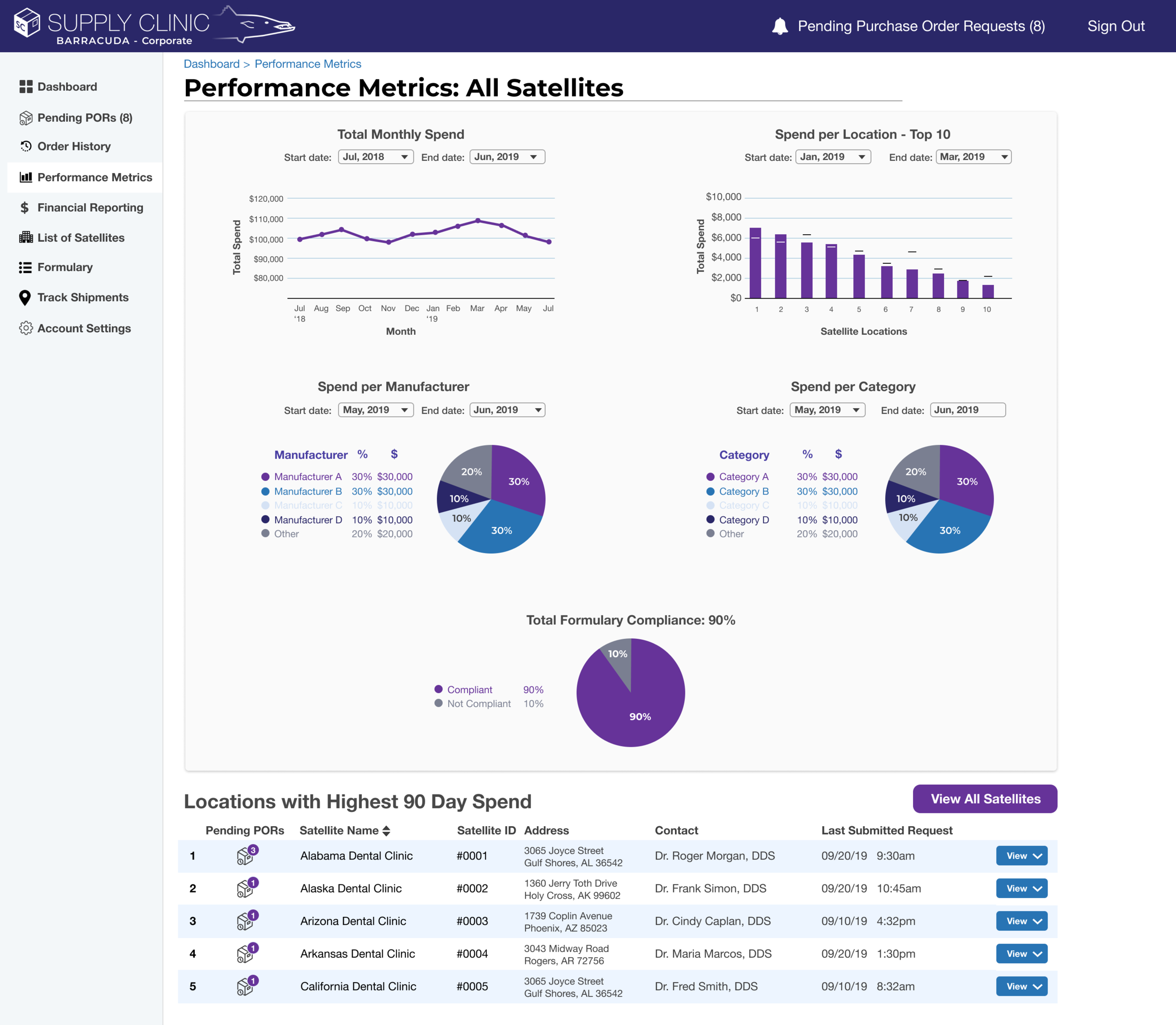
The Corporate user’s Data Visualization page, showing DSO-wide metrics.
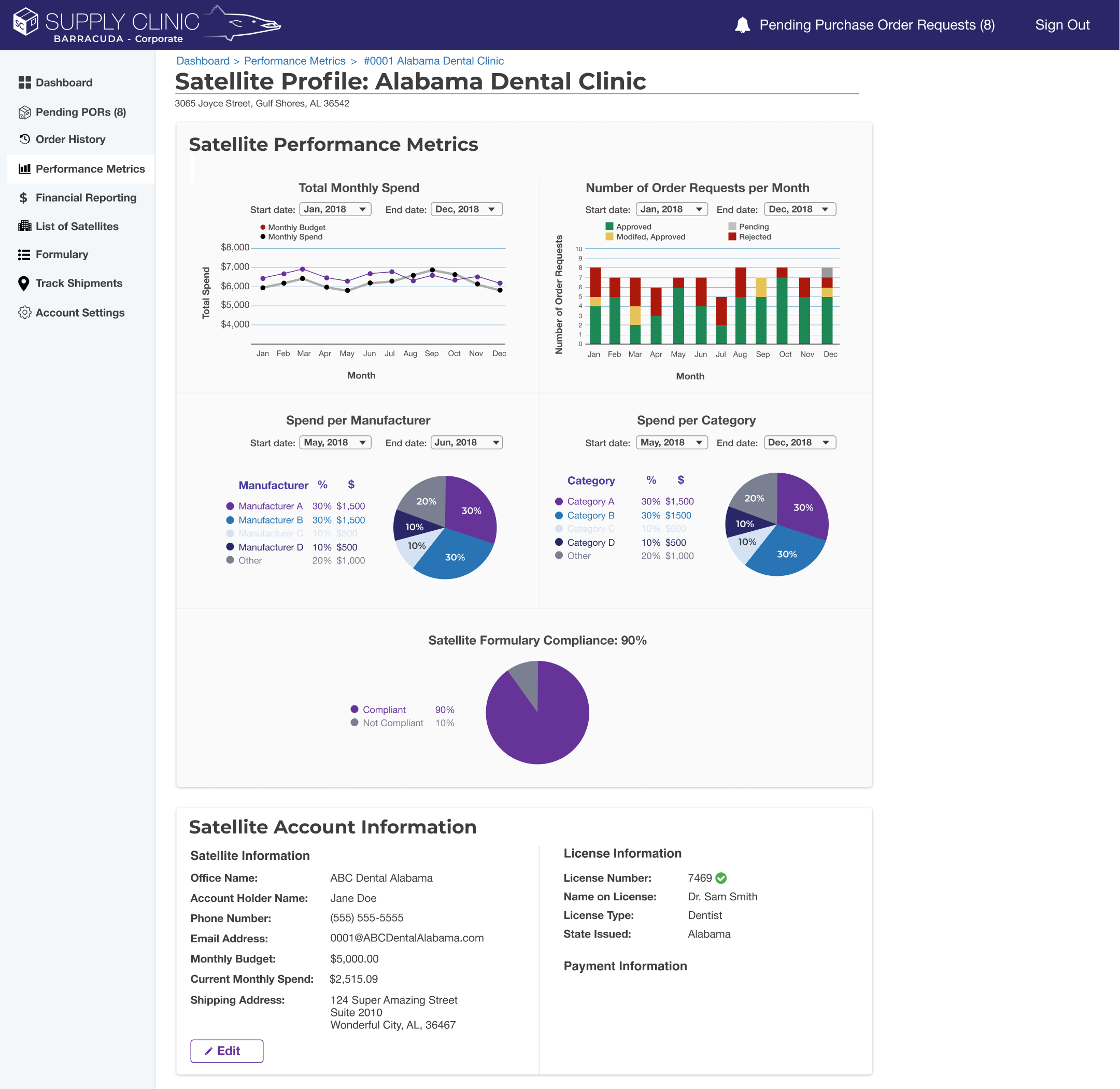
The Corporate user’s Performance Metrics page for a single Satellite.
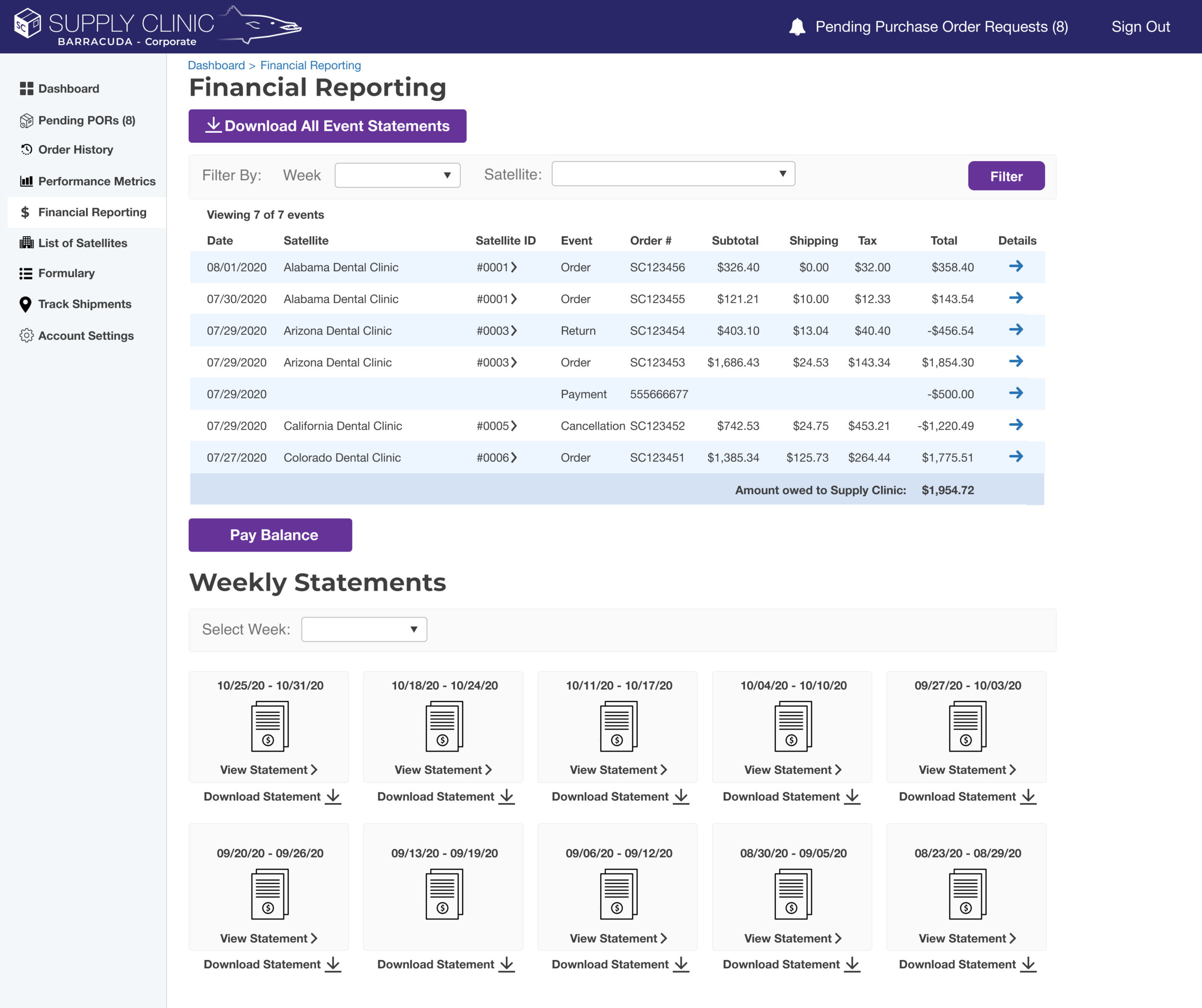
The Corporate user’s financial reporting page, showing Event Statements and Weekly Statements, with links going into details of each statement and invoice.
Likewise, Satellites need paper trails on order requests to keep track of order status and shipments. Additionally, they deserve traditional e-commerce tools that reward power users with a more efficient e-commerce experience. So, we ported several of Supply Clinic’s marketplace features into the Procurement Suite including easy reordering features and a list of favorite items.
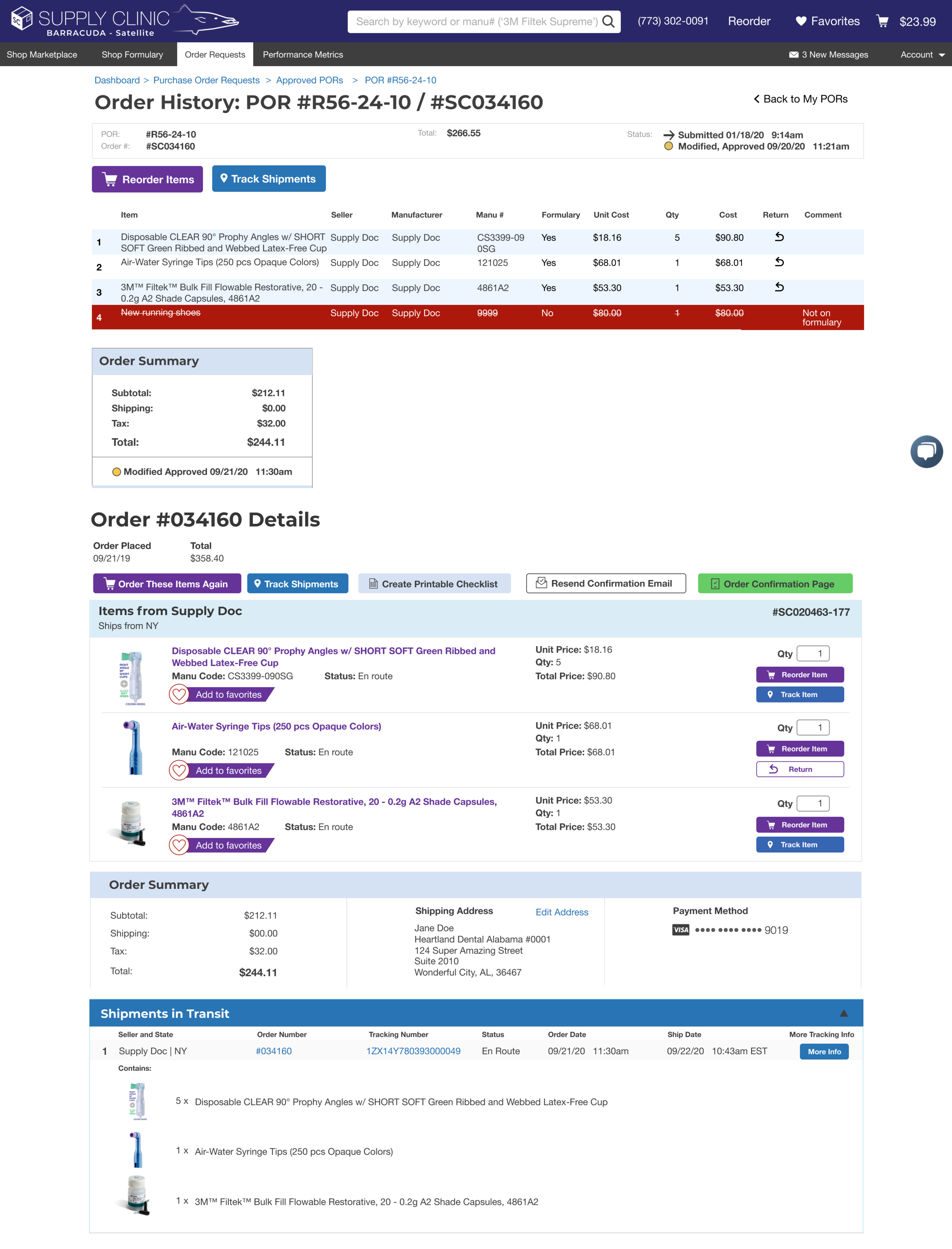
The Satellite user’s order history page allows the user to see the status and details of their order and tracking information. They’re also able to easily reorder items and add them to their “favorites list”.
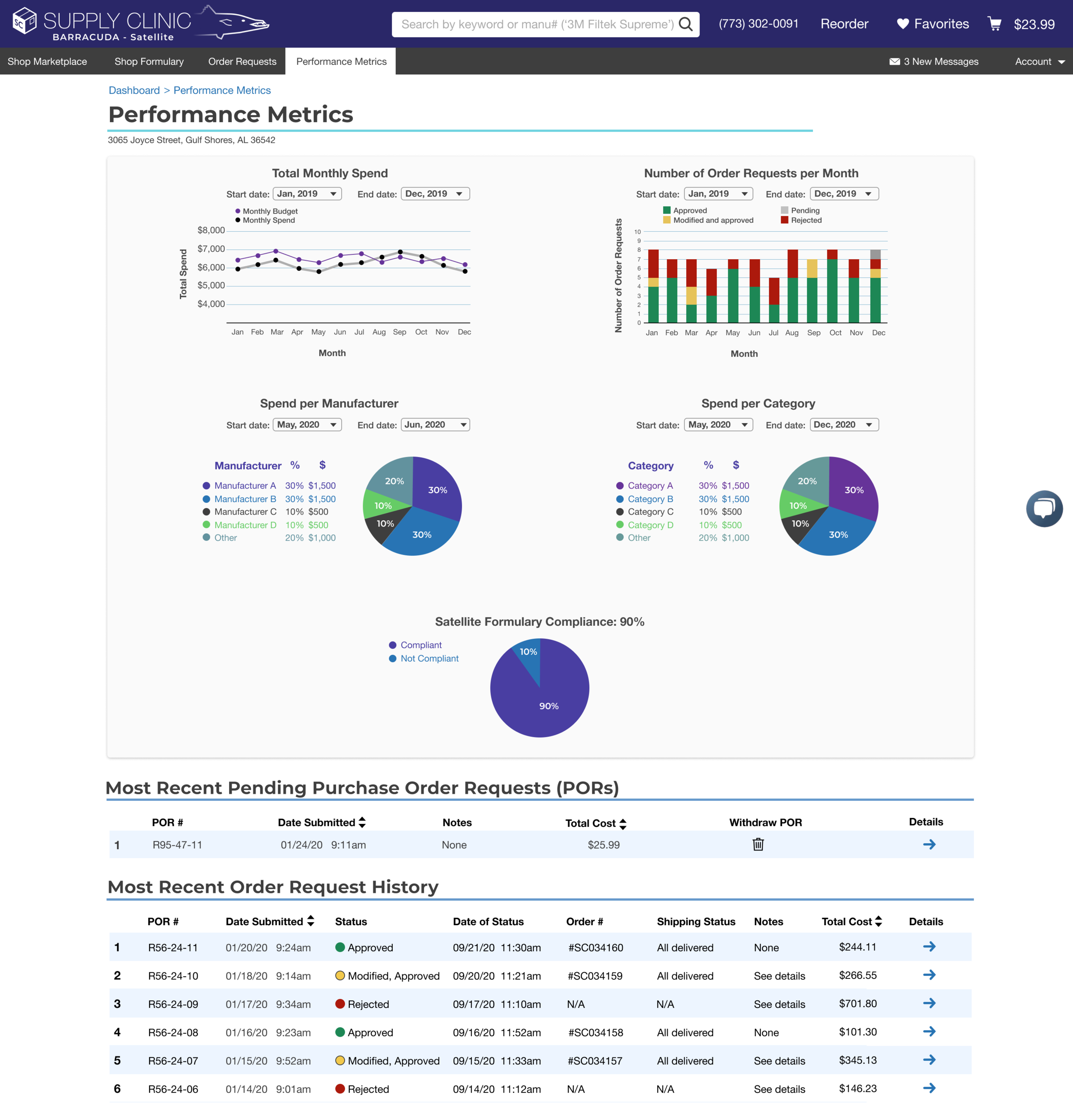
The Satellite user’s Performance Metrics page gives them a bird’s-eye-view to their purchasing habits.
Prototypes
I initially tested the prototypes internally with Supply Clinic’s customer service team, iterated through several cycles, and then sent the prototypes to prospective clients. After testing the prototypes, our clients replied back with feedback and feature suggestions:
“It’s simple, but this is a total game changer!”
“I’ve been waiting for something like this to come along. Looks great too!”
“It’d be super convenient if corporate accounts could order on behalf of a satellite.”
MVP and Beyond
After a few more rounds of iterations, prototyping, and testing, we agreed on a MVP along with a roadmap for building additional features. While building the MVP, I used components from Supply Clinic’s design system with the intent on elaborating on them in future iterations of the Procurement Suite.
After we deployed the webapp and early adopters were onboarded, I collected quantitative usability information via Hotjar, Google Analytics, and Heap. Additionally, the customer service team collected qualitative information via phone calls and emails. We continue to collect usability information to this day.
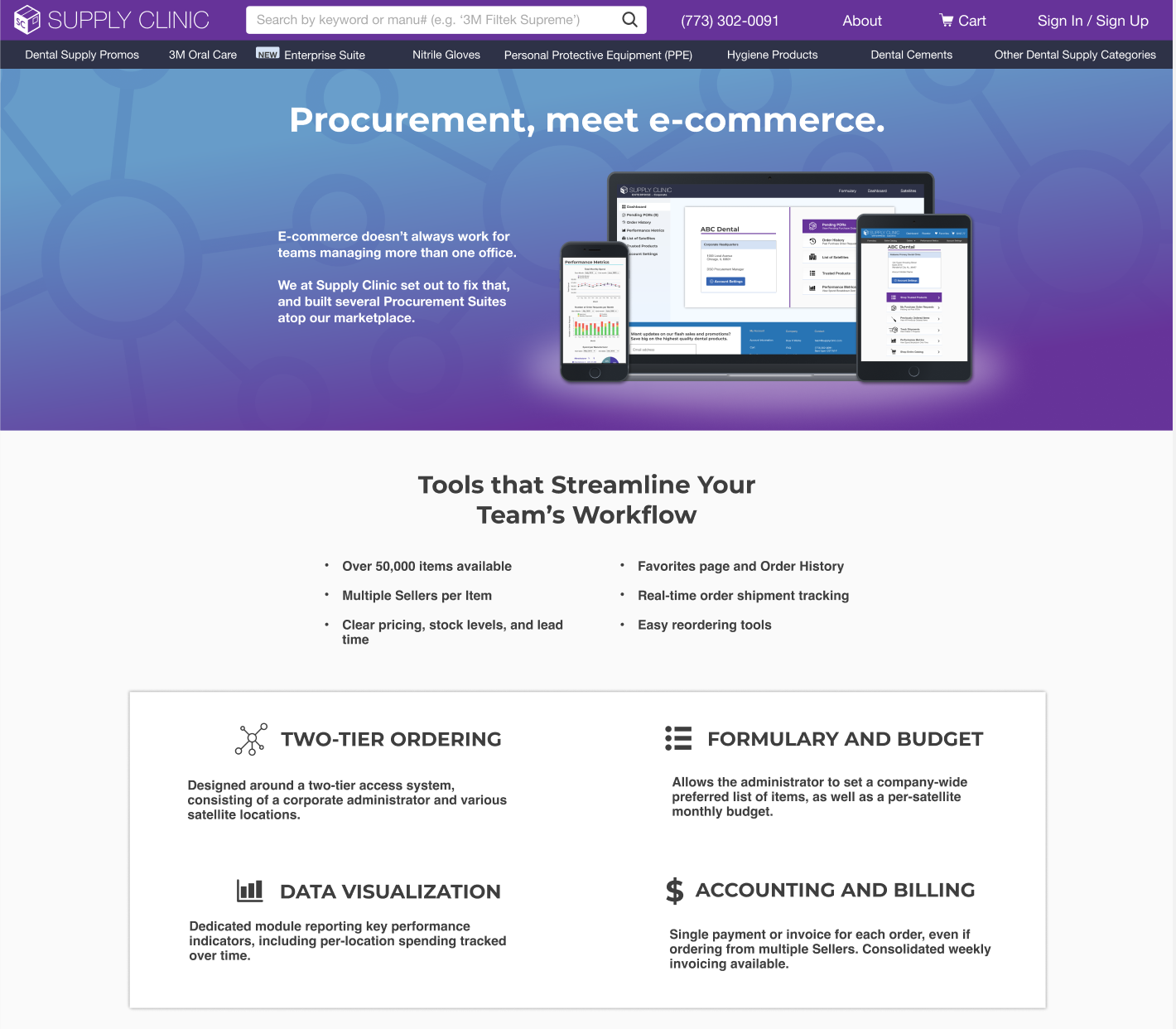
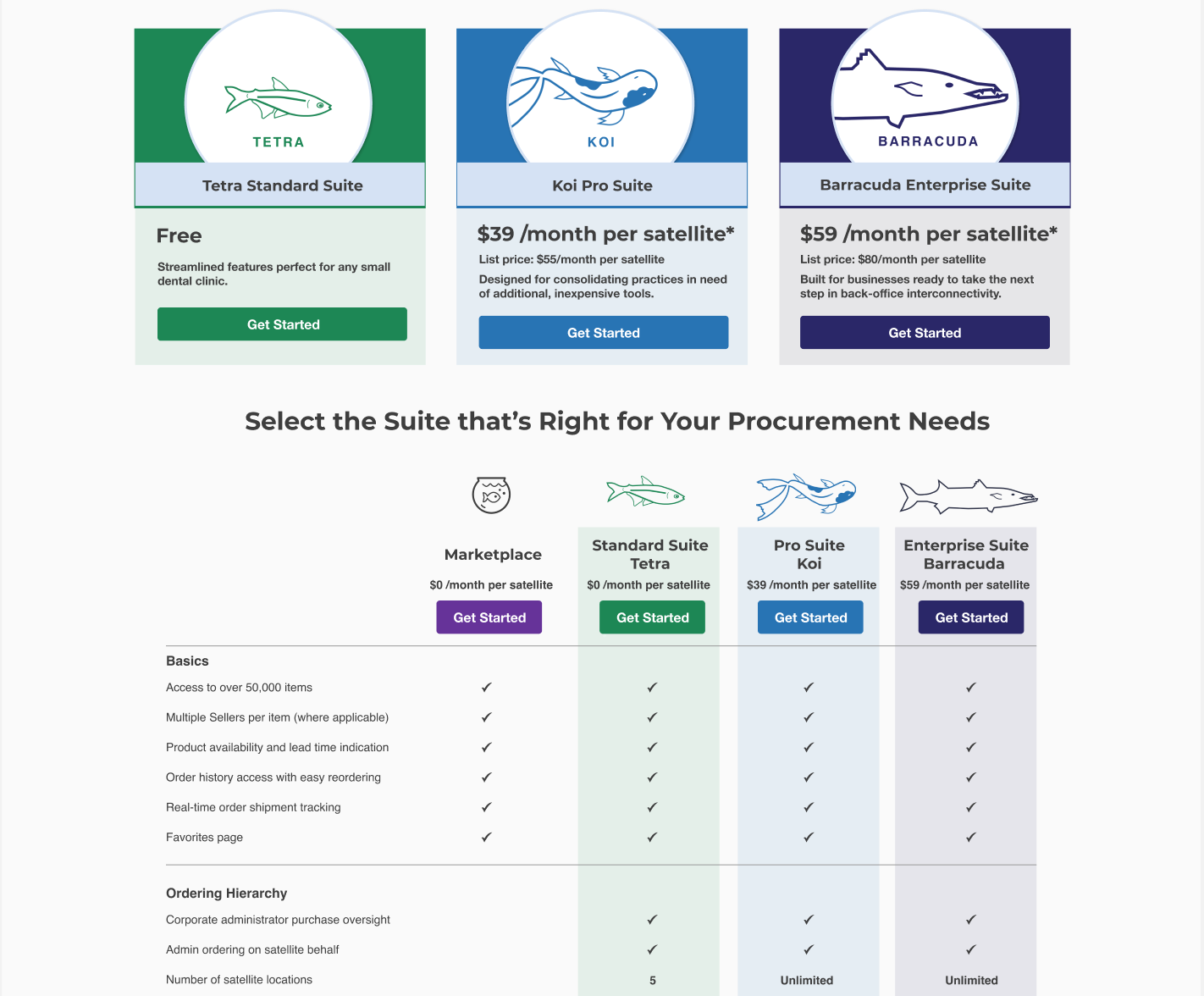
Although using Supply Clinic’s marketplace as a single-location dental office is free, there’s a subscription fee for DSOs to use the Procurement Suite. One challenge Supply Clinic had was convincing less tech-savvy DSOs to adopt our platform’s subscription-based procurement suite model. To lower the barrier to entry, we decided to establish subscription tiers, each with more powerful features. Here, I created the Supply Clinic webpage interface (including drawing the aquatic graphics) to better explain to our users the different procurement suite subscription tiers. Since the Procurement Suite is built upon Supply Clinic’s proprietary e-commerce marketplace, we figured that DSOs would find value in its combination with the multi-location procurement tools. Once the added value of the Procurement Suite is realized, Supply Clinic will upsell the DSO with more features, such as more extensive data-reporting features and more detailed transaction ledges for improved accounting. This page has been vital in selling to prospective clients and spreading adoption.
Takeaways
By synthesizing the data we gathered, focusing on salient themes, iterating through prototypes, and usability testing, I was able to design and build a unique product that addressed the needs of Supply Clinic’s clients. The Procurement Suite was able to scale revenue up by 250% and help Supply Clinic’s business grow.